- Published on
AWS Introductions
- Authors
- Name
Introduction
`AWS ...
1. AWS Global Infrastructure (Hạ tầng toàn cầu)
- AWS Regions
- AWS Availability Zone
- AWS Data Center
- AWS Edge Locations/Points of Presence
AWS Regions
- Là Khu vực địa lý mà AWS đặt Data Center
- Các yếu tố lựa chọn Regions phù hợp:
- Compliance (Tuân thủ): Tuân thủ các quy định về quản trị dữ liệu và pháp lý: Dữ liệu không bao giờ rời khỏi khu vực mà không có sự cho phép rõ ràng của bạn. Ví dụ các quy định của chính phủ, các ngân hàng, ko được đặt region bên ngoài khu vực
- Proximity (Độ trễ)
- Available servers
- Pricing
AWS Availability Zones
- Mỗi Regions sẽ có nhiều Availability Zones(thông thường là 3, min 3, max 6)
- Example: • ap-southeast-2a • ap-southeast-2b • ap-southeast-2c
- Mỗi AZ bao gồm 1 hoặc nhiều Data Center với redundant power, networking, connectivity
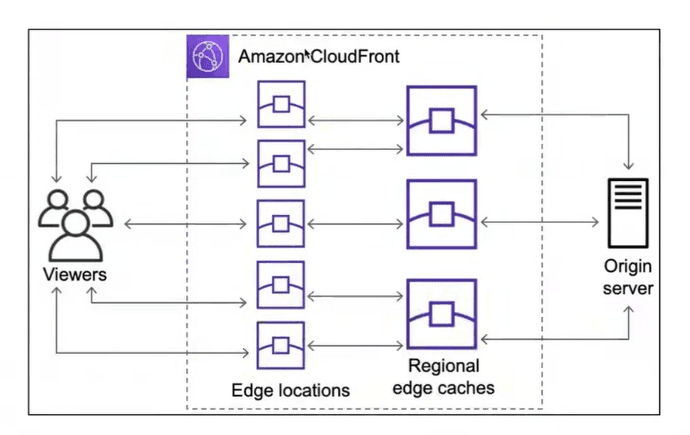
AWS Edge Locations
- Cache data
- Cung cấp content với độ trễ thấp (lower latency)
- Dùng CloudFront để tận dụng Edge locations
2. IAM & AWS CLI
2.1. IAM: Users & Groups
- IAM = Identity and Access Management, Global service
- Root account created by default, không nên dùng thường xuyên hoặc shared
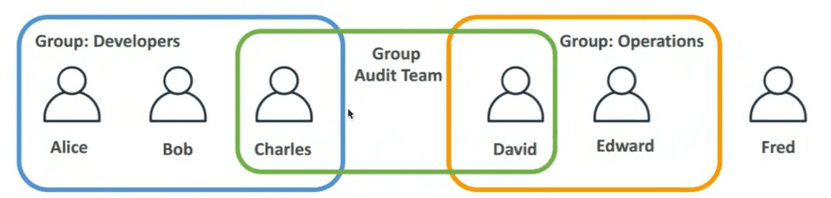
- Users là những người bên trong tổ chức, được nhóm lại
- Groups chỉ chứa user, không chứa group khác
- Users có thể thuộc 1 hoặc nhiều group
2.2. IAM permissions
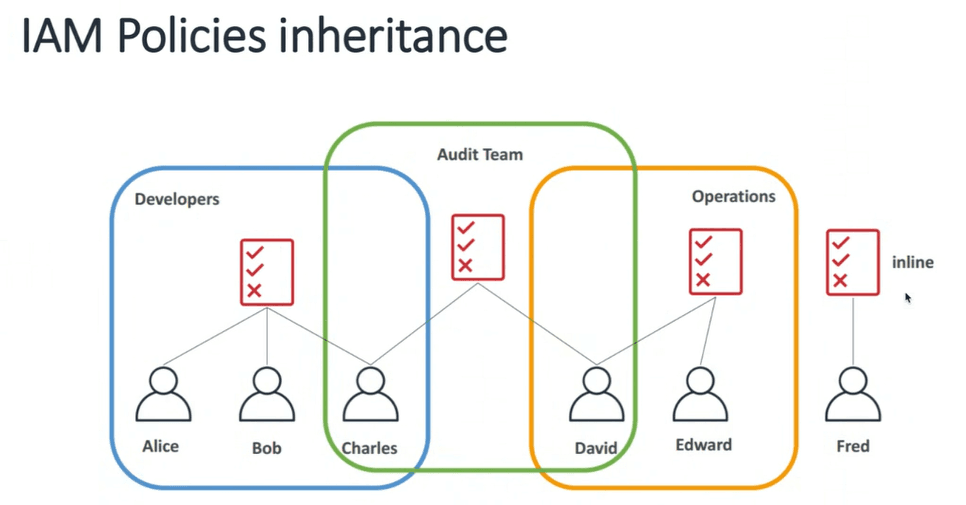
- Users or groups can be assigned JSON documents called policies
- These policies define the permissions of user
- In AWS, appy the least privilege principle: don't give more permissions than a user needs
IAM Policies Structure.
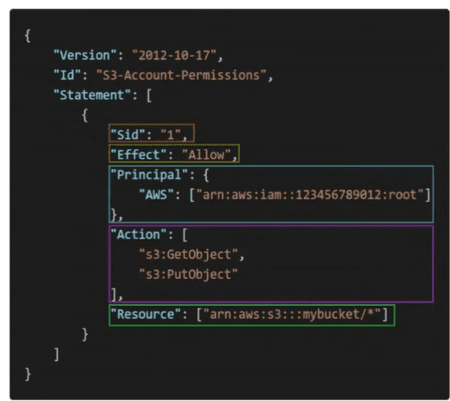
- Consists of:
Version: cố định "2012-10-17"Id: an identifier for the policy (optional)Statement: one or more individual statements (required)
- Statements consists of:
Sid: an identifier for statement (optional)Effect: Allow, DenyPrincipal: Đối tượng: account/user/roleAction: list of actions this policy allows or deniesResource: list of resource to which the action applied toCondition: condition for when this policy is in effect (optional)
Password policy
MFA
- Protect your Root Accounts and IAM users
- MFA = password + security device
2.3. How can users access AWS?
- Have 3 options:
- AWS Management Console (protected by password & MFA)
- AWS CLI: protected by access keys
- AWS Software Developer Kit (SDK): for code, by access keys
3. IAM Roles for Services
- AWS services need to perform actions. To do so, we will assign permissions to AWS services with IAM Roles
- Ví dụ service EC2 muốn upload 1 file lên service S3, hoặc muốn download 1 object từ S3, thì EC2 cần phải có quyền trên S3 -> Sẽ cần gắn cho EC2 1 role, role đó có 1 policy mà có quyền trên S3
IAM Guidelines & Best Practices
- Không sử dụng root account ngoại trừ dùng cho vic setup account AWS
- Assign users to groups, and assign permissions to groups
- Create a strong password policy
- Use MFA
- Create and use
Rolesfor giving permissions to AWS services - Use Access Key khi dùng CLI / SDK
- Never share IAM users & Access Keys